You can set up unity catalogs in Databricks and reverse engineer them into erwin Data Modeler.
This process involves the following steps:
Creating user cluster enables you to access unity catalogs in Databricks.
To create a user cluster, follow these steps:
- Log in to the Microsoft Azure Databricks portal using your Databricks account.
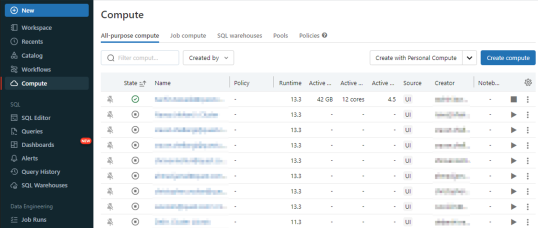
- On the left side navigation panel, go to Compute tab, and click Create compute.
The cluster configuration page appears.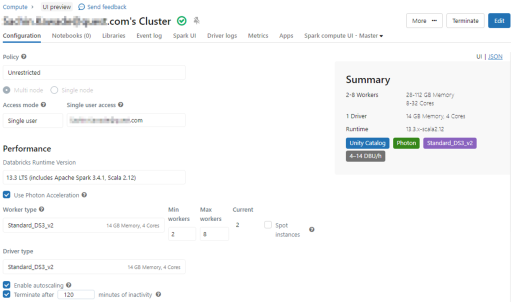
- In the configuration page, configure the parameters based on the following table.
Fields
Parameter
Additional Information
Access mode Single user Selecting the Single user option will enable Unity Catalog creation in the database.
Databricks Runtime Version 13.3 LTS, 12.2 LTS, and 11.3 LTS - Click Create compute.
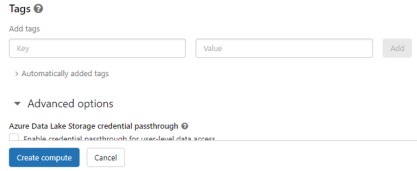
The user cluster is created.
Once you have created a user cluster, you can generate the access token. You can use this access token to get access to the database using erwin DM.
To generate the access token, follow these steps:
- In the right-top corner, click the email address, and select User Settings option.
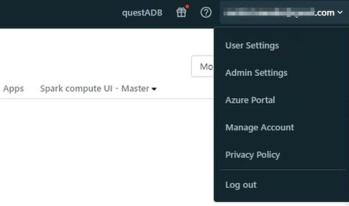
The Settings page appears.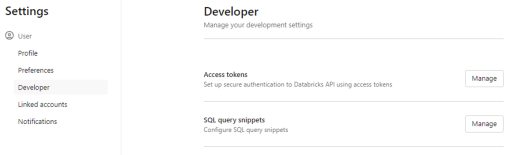
- Go to Developer > Access tokens > Manage.
The Access tokens page appears.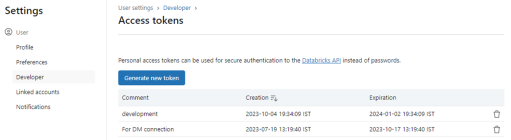
- Click Generate new token.
The Generate new token page appears.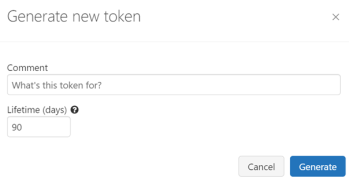
- Add comments and set an expiry for the token. Then, click Generate.
The token is generated and this expires after certain days. After expiry, you can generate another token using the above steps.
Once the access token is generated, use the following steps to run the user cluster and copy the JDBC string.
- Go to Compute tab and locate the user cluster that you created.
- Click
 to run the cluster.
 - Once the user cluster starts, open the cluster, and expand the Advanced options.
- Go to the JDBC/ODBC tab, copy the JDBC string from the JDBC URL section. This string can be used to connect to the Databricks from erwin DM for reverse engineering. For more information about the connection details, refer to the Database Connection Parameters topic.
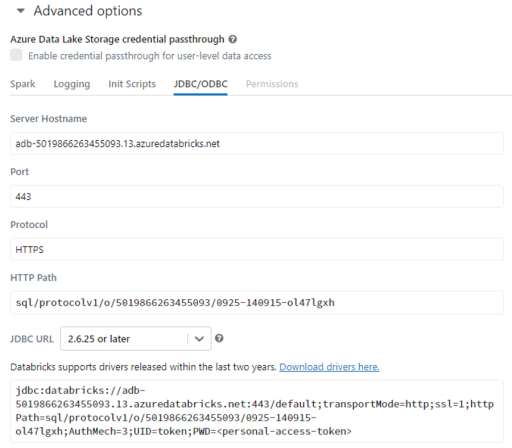
When you copy the JDBC string, ensure that you copy the string up to "AuthMech=3".